 TidyMac
If you mainly use CleanMyMac to free space and remove apps, TidyMac covers that for $9.99 once: it explains every part of System Data, labels what’s safe, cleans to the Trash after you confirm twice, uninstalls apps with their leftovers, and watches temperature and storage. It doesn’t scan for malware or update your apps.
What you keep if you switch
- Cleanup of caches, logs, old installers, device backups, Time Machine snapshots and developer files, each explained and labelled.
- An uninstaller that removes apps together with their leftovers. How it works
- A disk map: treemap and sunburst views of your whole drive. Storage manager
- A menu bar monitor: Mac Health with free space, memory, CPU and battery.
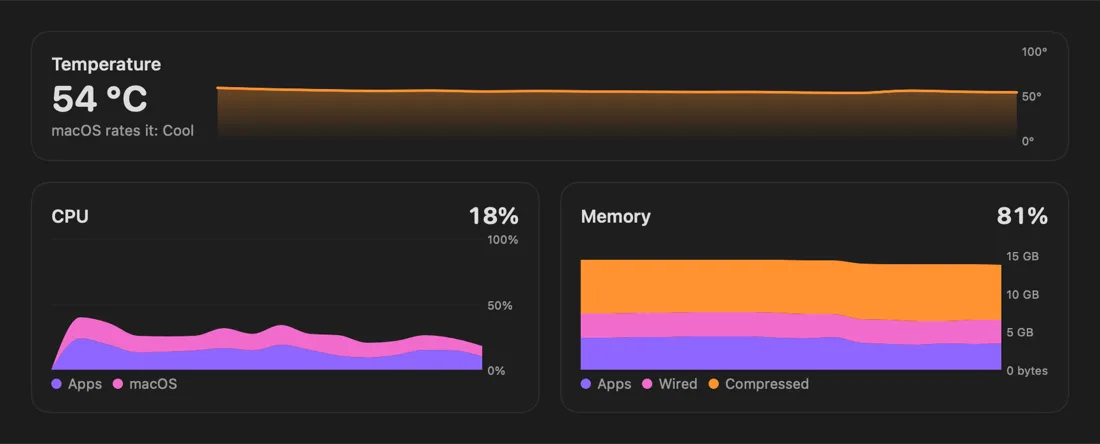
- Performance: real temperature, CPU and memory, and a cool-down Boost that doesn’t quit your apps.
What you’d give up
- Malware scanning. TidyMac doesn’t do it, by design. macOS includes XProtect and Gatekeeper, which check apps for known malware.
- An app updater. Use the App Store and each app’s own updates.
- Anything else in a suite you rely on. Check the list of tools you actually use before you switch.
Other alternatives worth knowing
- macOS Storage settings (free, built in): recommendations for iCloud, the Trash and large documents, but System Data can’t be opened. Compared
- DaisyDisk (one-time purchase): a beautiful visual map, with every decision left to you. Compared
- OmniDiskSweeper (free): folders sorted by size, for people who already know what’s safe. Compared
- AppCleaner (free): drop an app on it to find its related files.
- Terminal: du, tmutil and each tool’s own clean command. 8 useful commands
Switching without surprises
Remove CleanMyMac the way MacPaw’s support site describes, and manage or cancel your subscription in your MacPaw account if you don’t want it to renew. Then run TidyMac’s scan; nothing is removed until you review it and confirm twice.
TidyMac vs CleanMyMac at a glance
| Feature | TidyMac | CleanMyMac |
|---|---|---|
| Explains each part of System Data in plain English | Yes, five answers per category | Groups items into cleanup categories |
| Safety label on every item (Safe / Check first / Leave alone) | Yes | Not in this form |
| Confirm before deleting | Always, twice; or choose Move to Trash | See their docs |
| Storage history and “full in N days” forecast | Yes | Not a focus |
| Apple Intelligence (macOS 27) checklist | Yes, all 11 settings | Not a focus |
| AI agents can read storage (MCP) | Yes, read-only by default | No |
| Malware removal, app updater | No, by design | Yes |
| App uninstaller with leftovers | Yes | Yes |
| Price model | $9.99 once | Mainly subscription |
Based on MacPaw’s public website, October 2026. Plans and features change; check macpaw.com for current details. The full comparison

Let TidyMac do this for you
See every part of your storage explained, and clean only what’s safe after you confirm twice. $9.99, one time.
Frequently asked questions
Is TidyMac a full replacement for CleanMyMac?
For storage, it covers cleanup, uninstalling apps with leftovers, a disk map and a menu bar monitor. It doesn’t include malware removal or an app updater. If you rely on those, CleanMyMac (or keeping both) may suit you better.
Is there a free CleanMyMac alternative?
Yes, for parts of it: macOS Storage settings, OmniDiskSweeper and AppCleaner are free. TidyMac isn’t free; it’s a one-time purchase that adds explanations, safety labels, verified cleaning, history and alerts.
Do I need antivirus on a Mac?
macOS includes built-in malware protection (XProtect) and Gatekeeper, which checks apps before they open. Whether you want more is your call; TidyMac deliberately doesn’t do malware scanning.
Can I use TidyMac and CleanMyMac together?
Yes. TidyMac only removes what you review and confirm, and everything goes to the Trash first, so it won’t fight with another tool.
How much does TidyMac cost?
$9.99, once, for two of your Macs. That’s the launch price for the first 100 buyers; after that it’s $24. No subscription, no account, and every 1.x update is included.
Which Macs does TidyMac support?
macOS 15 Sequoia or later, on Apple silicon and Intel. Macs with Apple Intelligence use it for explanations; others can add an optional 241 MB on-device model.